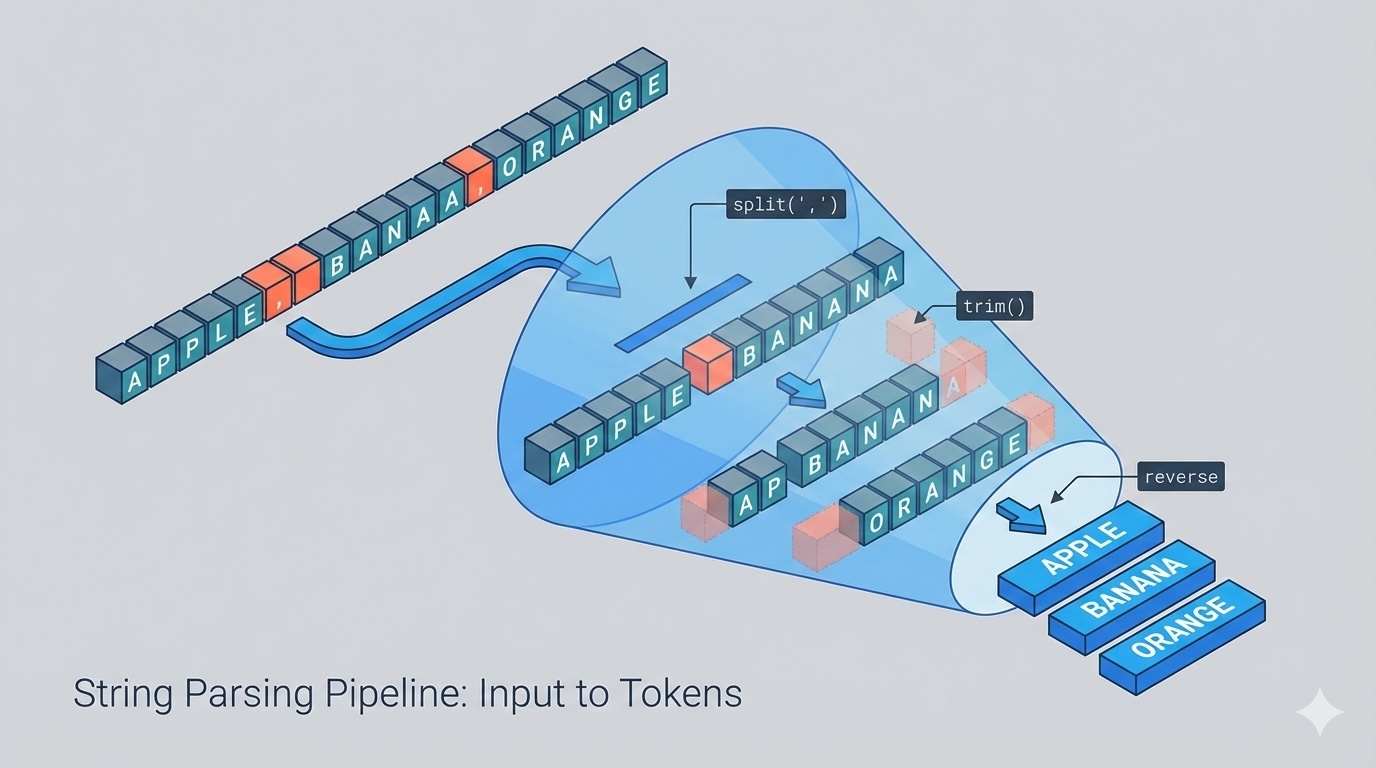
Common Parsing Operations
String parsing typically involves a few core operations. Let's explore each one with code examples.
1. Splitting Strings by Delimiter
The most common parsing operation is splitting a string into parts based on a delimiter.
# Python: Split by comma
data = "apple,banana,cherry,date"
fruits = data.split(",")
print(fruits)  # ['apple', 'banana', 'cherry', 'date']

# Java: Split by comma
String data = "apple,banana,cherry,date";
String[] fruits = data.split(",");
// ["apple", "banana", "cherry", "date"]

// C++: Split by delimiter (requires stringstream)
#include <sstream>
#include <vector>
std::string data = "apple,banana,cherry,date";
std::stringstream ss(data);
std::string segment;
std::vector<std::string> fruits;
while (std::getline(ss, segment, ',')) {
    fruits.push_back(segment);
}
2. Extracting the Last Word (Reverse Traversal)
This is a classic example of efficient parsing. Instead of splitting the entire string and taking the last element, we traverse from the end.
# Python: Extract last word
def length_of_last_word(s: str) -> int:
    i = len(s) - 1
    length = 0
    # Skip trailing spaces
    while i >= 0 and s[i] == ' ':
        i -= 1
    # Count the last word
    while i >= 0 and s[i] != ' ':
        length += 1
        i -= 1
    return length

# Java: Extract last word
public int lengthOfLastWord(String s) {
    int i = s.length() - 1;
    int length = 0;
    // Skip trailing spaces
    while (i >= 0 && s.charAt(i) == ' ') {
        i--;
    }
    // Count the last word
    while (i >= 0 && s.charAt(i) != ' ') {
        length++;
        i--;
    }
    return length;
}

// C++: Extract last word
int lengthOfLastWord(string s) {
    int i = s.size() - 1;
    int length = 0;
    // Skip trailing spaces
    while (i >= 0 && s[i] == ' ') {
        i--;
    }
    // Count the last word
    while (i >= 0 && s[i] != ' ') {
        length++;
        i--;
    }
    return length;
}
3. Trimming Whitespace
Handling leading and trailing whitespace is crucial in parsing.
# Python: Trim whitespace
text = "   hello world   "
trimmed = text.strip()
print(trimmed)  # "hello world"

# Java: Trim whitespace
String text = "   hello world   ";
String trimmed = text.trim();
// "hello world"

// C++: Trim whitespace (manual implementation)
#include <algorithm>
#include <cctype>
std::string trim(const std::string& str) {
    auto start = std::find_if_not(str.begin(), str.end(), [](unsigned char ch) {
        return std::isspace(ch);
    });
    auto end = std::find_if_not(str.rbegin(), std::string::const_reverse_iterator(start),
        [](unsigned char ch) { return std::isspace(ch); }).base();
    return std::string(start, end);
}
Complexity Analysis
Understanding the performance characteristics of parsing operations is essential for writing efficient code.
- Split operation: O(n) time and space, where n is the string length. You must scan the entire string and allocate storage for the resulting parts.
- Reverse traversal for last word: O(n) time in the worst case, but typically O(k) where k is the length of the last word plus trailing spaces. O(1) extra space.
- Trim operation: O(n) time for scanning, O(1) or O(n) space depending on whether you create a new string or modify in place.
Professional Patterns
Pattern 1: State Machine Parsing
For complex parsing tasks, use a state machine approach. Track what state you're in (e.g., "in word", "in delimiter", "in quoted section") and transition based on the current character.
# Python: State machine for parsing CSV with quoted fields
def parse_csv_line(line):
    result = []
    current = []
    in_quotes = False
    for char in line:
        if char == '"':
            in_quotes = not in_quotes
        elif char == ',' and not in_quotes:
            result.append(''.join(current))
            current = []
        else:
            current.append(char)
    result.append(''.join(current))
    return result
Pattern 2: Sentinel Values
Use sentinel values to mark boundaries in your parsed data. For example, when parsing nested structures, use special markers to indicate the start and end of each level.
Pattern 3: Early Validation
Validate input format before parsing to fail fast. Check length, expected characters, or structural markers before investing computational resources in parsing.
Common Pitfalls
Pitfall 1: Off-by-one errors
When iterating through strings, remember that indices are zero-based. Always verify your loop conditions, especially when iterating backwards (i >= 0, not i > 0).
Pitfall 2: Not handling empty input
Always check if the input string is empty or contains only delimiters before attempting to parse. Otherwise, you might get unexpected results or exceptions.
Pitfall 3: Embarrassed delimiters
When delimiters appear within the data itself (like a comma inside a quoted string), naive splitting will fail. Use a proper parser or state machine for these cases.
Pitfall 4: Encoding issues
Be aware of character encoding. UTF-8 strings can have multi-byte characters, and iterating byte-by-byte will break them. Use proper Unicode-aware string operations.
Production Tips
- Use built-in functions when possible: Languages provide optimized parsing functions. Use split(), trim(), and regex engines instead of rolling your own unless you have specific requirements.
- Pre-allocate when size is known: If you know the approximate number of tokens, pre-allocate arrays/vectors to avoid reallocation overhead.
- Handle malformed input gracefully: Production parsers should never crash on bad input. Return error codes, throw meaningful exceptions, or use result types.
- Consider streaming for large inputs: For parsing large files or streams, process incrementally rather than loading everything into memory.
- Write tests for edge cases: Test empty strings, strings with only delimiters, Unicode characters, and maximum-length inputs.
The Journey Continues
We've covered practical implementation details, common patterns, and pitfalls to avoid. You now have the tools to implement robust string parsing in your applications. But there's a deeper level to explore—how does string parsing perform at the hardware level?
In Level 3, we'll dive into CPU cache considerations, memory layout effects, SIMD instructions, and performance optimization techniques that can make your parsing code run 10x faster. This is where parsing meets systems programming.